SMD Component Packages: 0201, 0402, 0603, 0805 Explained
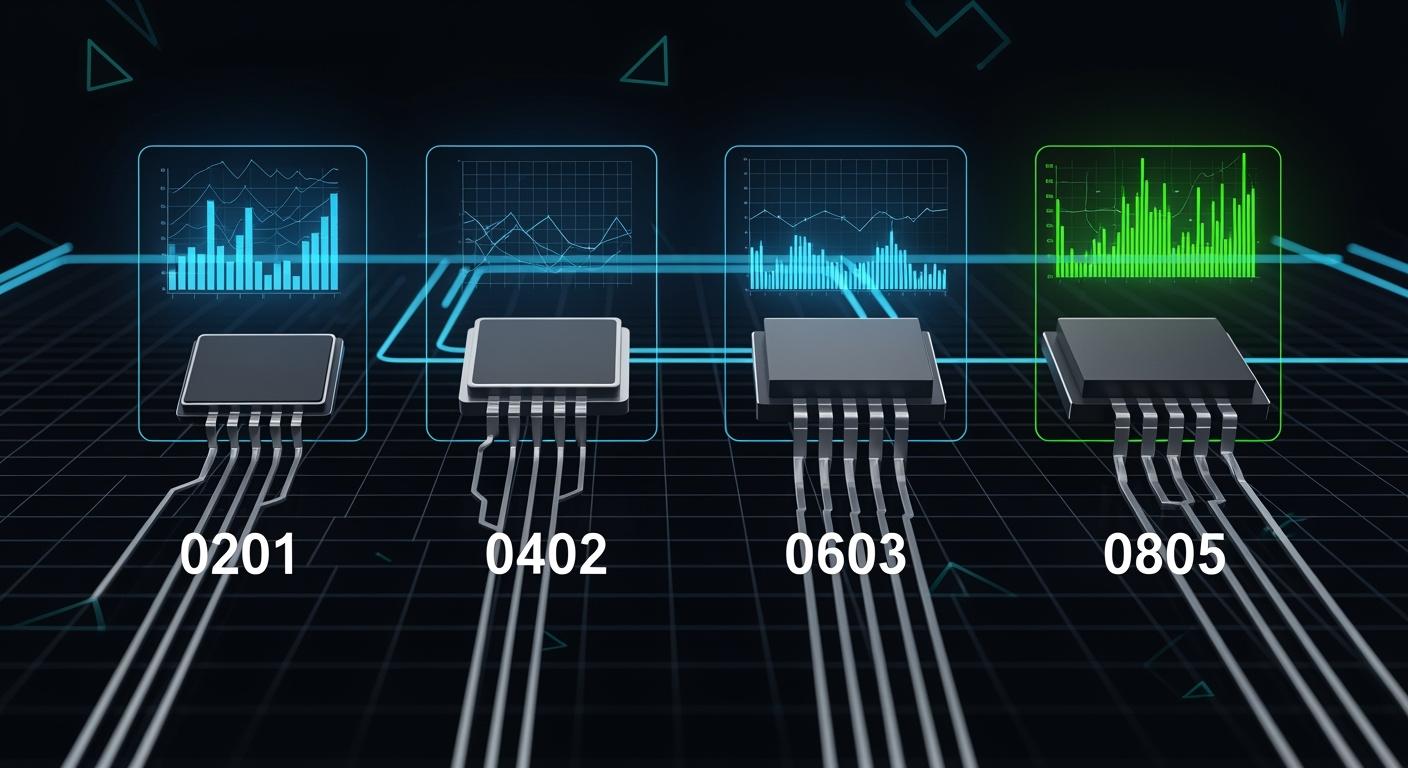
When you work with modern electronics, you often see smd component packages labeled as 0201, 0402, 0603, or 0805. These codes tell you the size of the smd components you use on a circuit board. SMD stands for surface-mount device, which means you place the components directly onto the surface of a board. The size of each package affects how much space you save and how much power the components can handle. You need to know the differences between these sizes for better design and easier assembly. For example, an 0603 component is about 1.6mm by 0.8mm. Here is a quick look at the most common sizes:
Imperial Code | Metric Code | Dimensions (mm) | Power Rating | Hand Solder Feasibility |
|---|---|---|---|---|
0201 | 0603M | 0.6 × 0.3 | 0.05W | No |
0402 | 1005M | 1.0 × 0.5 | 0.063W | Difficult |
0603 | 1608M | 1.6 × 0.8 | 0.1W | Possible |
0805 | 2012M | 2.0 × 1.25 | 0.125W | Yes |
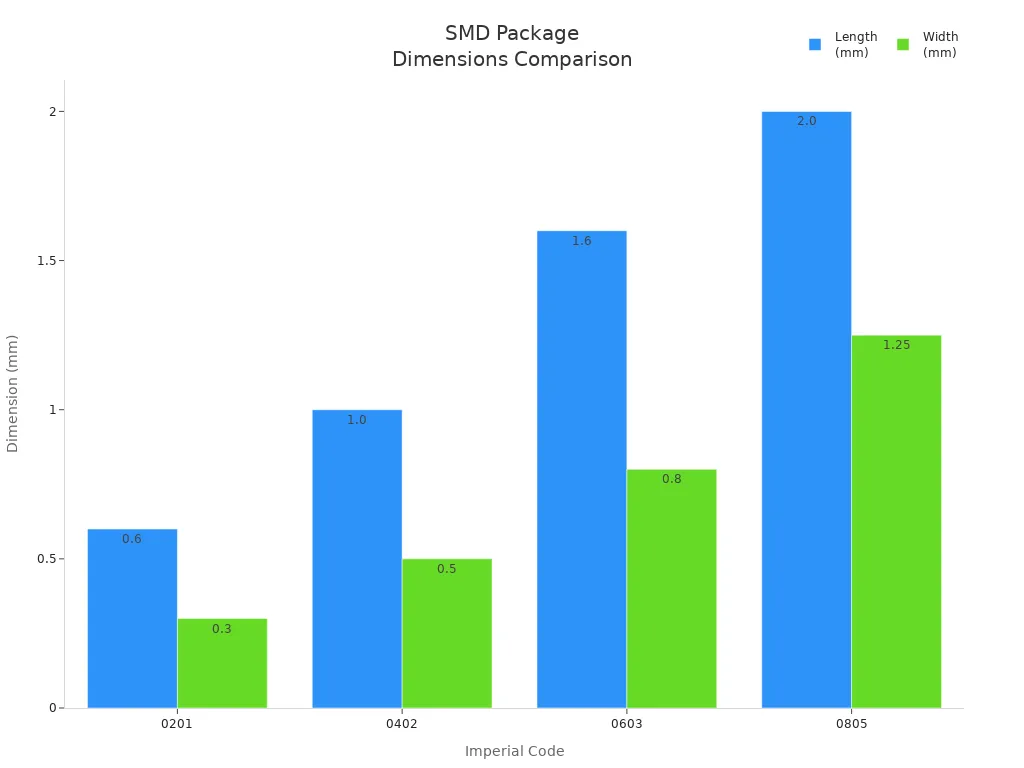
You can see how these sizes fit different needs in your projects. Knowing the right smd size helps you choose the best components for your design.
Key Takeaways
Learn what SMD codes like 0201, 0402, 0603, and 0805 mean. These codes show the size of parts. The size can change how your circuit works.
Pick the right SMD size for your project. Small sizes save space on your board. Big sizes can handle more power. Big sizes are also easier to put on the board.
Know the difference between imperial and metric systems. Mixing these two systems can cause mistakes when picking parts.
Think about how hard it is to put SMDs on the board. Small parts need special tools to place and solder them.
Always look at your board space and power needs. This helps you pick the best SMD package for your project.
SMD Component Packages And Naming
SMD Package Code Meaning
When you look at smd component packages, you see codes like 0201, 0402, 0603, and 0805. These codes tell you the size of the smd components. Each code uses four digits. The first two digits show the length, and the last two show the width. You measure these numbers in hundredths of an inch for the imperial system. For example, a 0603 package means the component is 0.060 inches long and 0.030 inches wide. This system helps you quickly compare the size of different surface mount devices.
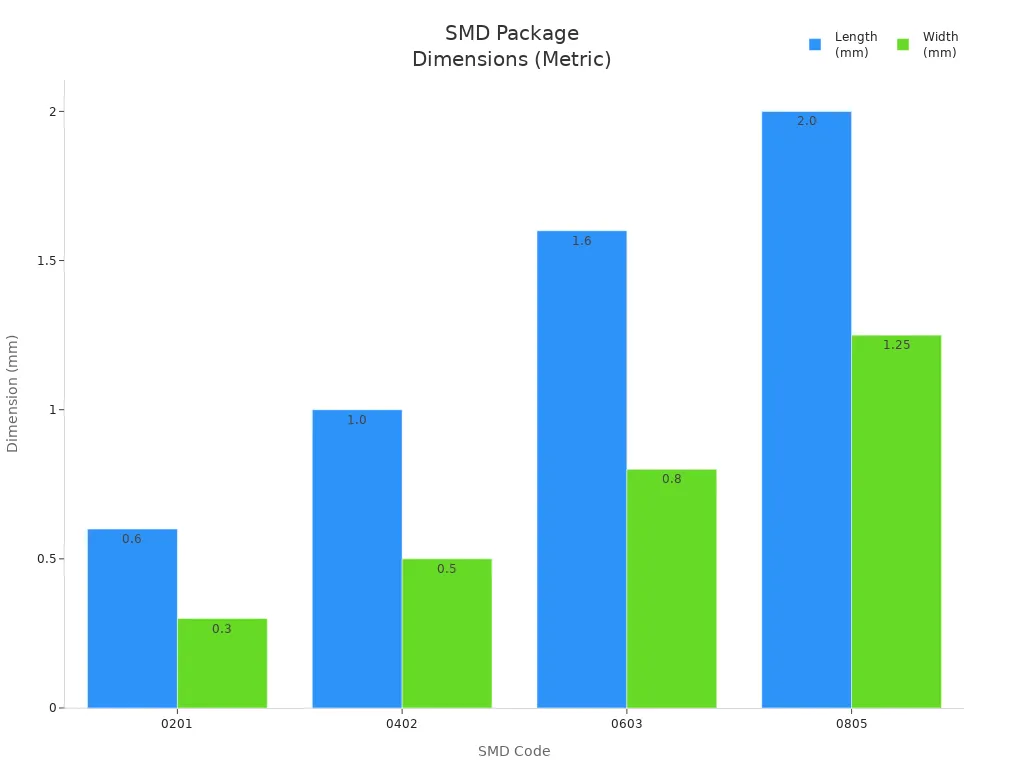
Here is a table that shows how the most common smd size codes match their physical dimensions:
SMD Code | Imperial Dimensions (L x W) | Metric Dimensions (L x W) |
|---|---|---|
0201 | 0.024" × 0.012" | 0.6 mm × 0.3 mm |
0402 | 0.040" × 0.020" | 1.0 mm × 0.5 mm |
0603 | 0.063" × 0.031" | 1.6 mm × 0.8 mm |
0805 | 0.079" × 0.049" | 2.0 mm × 1.25 mm |
You can see that as the smd size code increases, the components get larger. This helps you pick the right size for your project.
SMD Sizing Systems
You will find two main systems for naming smd component packages: imperial and metric. The imperial system uses inches, while the metric system uses millimeters. Both systems use four-digit codes, but the numbers mean different things. For example, a 0603 code in imperial means 0.060 inches by 0.030 inches. In metric, a 1608 code means 1.6 mm by 0.8 mm.
System | Measurement Unit | Code Representation | Example Conversion |
|---|---|---|---|
Imperial | Hundredths of an inch | Length x Width in inches | 0603 = 0.060” x 0.030” |
Metric | Millimeters | Length x Width in mm | 1608 = 1.6 mm x 0.8 mm |
⚠️ Mixing imperial and metric codes can cause mistakes. For example, 0402 in imperial is not the same as 0402 in metric. Always check which system you use before choosing your smd components.
The industry often uses the same numbers for both systems, but the actual sizes are different. This can confuse you when you order components or design a board. Always double-check the size and system to avoid errors.
SMD Sizes Comparison
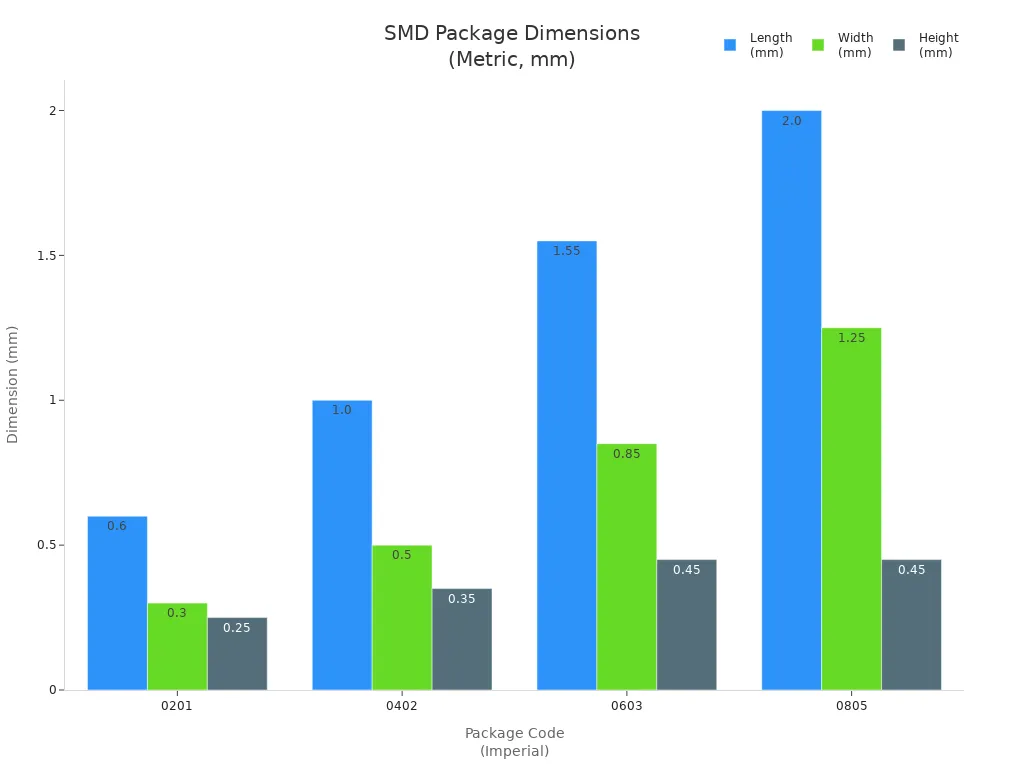
When you choose SMD sizes for your project, you need to understand how each size affects your circuit board. SMD components come in different packages, and each package has its own dimensions, power rating, and best use. You can see the differences clearly when you compare the four most common SMD sizes: 0201, 0402, 0603, and 0805.
Package Code (Imperial) | Package Code (Metric) | Length (L) | Width (W) | Height (H) | Power Rating (W) | Typical Applications |
|---|---|---|---|---|---|---|
0201 | 0603 | 0.024"/0.60 mm | 0.012"/0.30 mm | 0.010"/0.25 mm | 0.05 | Smartphones, IoT sensors, compact logic circuits |
0402 | 1005 | 0.04"/1.00 mm | 0.02"/0.50 mm | 0.014"/0.35 mm | 0.062 | High-density PCBs, medical and wearable devices |
0603 | 1608 | 0.06"/1.55 mm | 0.03"/0.85 mm | 0.018"/0.45 mm | 0.10 | Consumer electronics, signal conditioning, filtering |
0805 | 2012 | 0.08"/2.00 mm | 0.05"/1.25 mm | 0.018"/0.45 mm | 0.125 | Industrial PCBs, LED drivers, embedded systems |
0201 SMD Size
You find the 0201 SMD size in devices where space matters most. This size measures only 0.6 mm by 0.3 mm, with a height of about 0.25 mm. The power rating is 0.05W, which fits low-power circuits. You see these components in smartphones, IoT sensors, and compact logic circuits. The tiny size allows you to pack thousands of SMD components onto a single board. However, you need special machines to place and solder them. Hand soldering is not possible because the size is too small.
Note: 0201 SMD sizes help you build ultra-high-density circuits, but you must use high-precision equipment.
0402 SMD Size
The 0402 SMD size gives you a balance between small size and easier handling. This package measures 1.0 mm by 0.5 mm, with a height of 0.35 mm. The power rating is about 0.062W. You often use these components in high-density PCBs, medical devices, and wearables. The size lets you save space, but soldering by hand is difficult. You need accurate placement and careful solder paste printing.
0402 SMD sizes fit well in wearable sensors and medical electronics.
You can achieve high circuit density with these components.
0603 SMD Size
You see the 0603 SMD size in many consumer electronics. This package measures 1.55 mm by 0.85 mm, with a height of 0.45 mm. The power rating is 0.10W. You use these components for signal conditioning, filtering, and general electronics. The size is larger than 0201 and 0402, so you can solder them by hand if needed. You get a good balance between space saving and power handling.
SMD Package | Dimensions (mm) | Dimensions (inches) |
|---|---|---|
0603 | 1.5 × 0.8 | 0.06 × 0.03 |
Tip: 0603 SMD sizes are industry standards. You can inspect, rework, and assemble them easily.
0805 SMD Size
The 0805 SMD size is the largest of the four common packages. This size measures 2.0 mm by 1.25 mm, with a height of 0.45 mm. The power rating is 0.125W, and sometimes you find ratings up to 0.25W. You use these components in industrial PCBs, LED drivers, and embedded systems. The larger size makes hand soldering easy. You can handle more power, so you choose this size for circuits that need higher current.
0805 SMD sizes are best for applications where you need reliability and easy assembly.
You can use them in LED lighting, TV driver circuits, and home appliances.
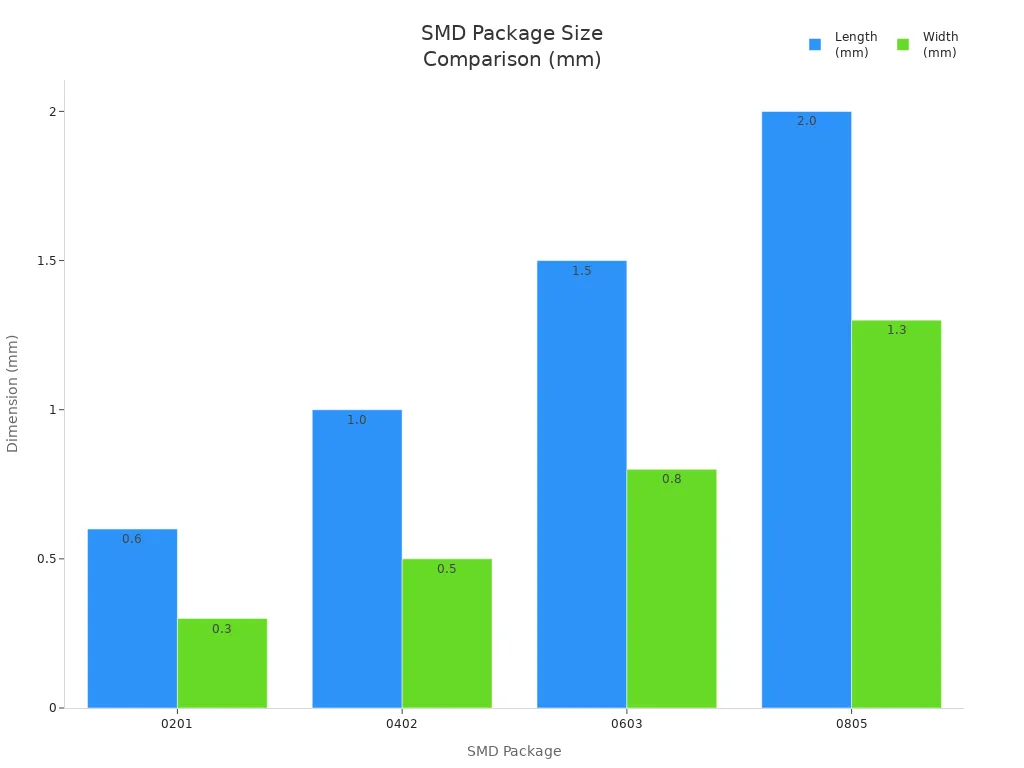
Block Quote: You need to match the SMD size to your project’s needs. Smaller sizes save space, but larger sizes handle more power and are easier to assemble.
Common SMD Sizes Applications
0201 Applications
The 0201 size is used in very small electronics. These parts fit where there is almost no space. You use them in:
Smartphone RF modules for signal filtering
Smartwatch power management circuits
Bluetooth earbuds and IoT sensor nodes
You also see 0201 parts in medical electronics and health monitors you can wear. This size lets you put more parts on a PCB. Your design gets more crowded, but that is good for small devices. Using 0201 smd sizes makes signal paths shorter. It also helps stop unwanted electrical problems. This makes high-frequency circuits work better.
Note: 0201 smd sizes make your circuits very small, but you need special machines to put them on the board.
0402 Applications
You pick 0402 smd sizes when you want small parts that are not too hard to use. These parts are good for:
Consumer electronics like smartphones and tablets
Wearable technology such as fitness trackers
IoT devices and high-density embedded systems
You also use 0402 parts in portable test tools. This size keeps your PCB small, but you can still put them on with special tools. The 0402 size is used a lot when you want to save space and have good performance.
0603 Applications
You find 0603 smd sizes in many things you use every day. This size is popular because it is easy to hold and solder. You use these parts in:
Signal conditioning and filtering circuits
General consumer electronics
Embedded systems and industrial controls
The 0603 size gives you a good mix of power and space saving. You can check and fix these parts without much trouble. That is why 0603 is one of the most used smd sizes for both new learners and experts.
0805 Applications
You choose 0805 smd sizes when you need parts that can handle more power and are easy to put on. These parts are best for:
Industrial PCBs and LED drivers
Home appliances and TV driver circuits
Embedded systems that need reliability
The bigger size of 0805 parts lets you use them in circuits with more current. You can also solder them by hand, which helps when you build or fix things.
SMD Size | Best For | Why Choose This Size? |
|---|---|---|
0201 | Ultra-compact, high-frequency | Maximum density, minimal signal loss |
0402 | High-density, wearable, IoT | Small size, good for advanced assembly |
0603 | Consumer, industrial, general use | Easy handling, balance of size and power |
0805 | Power, industrial, reliability | High power, easy assembly, suitable for hand soldering |
Tip: Always pick the smd component packages that fit your project. Small sizes save space. Big sizes handle more power and are easier to put on.
Selecting SMD Packages
Selection Factors
When you pick smd component packages, you need to think about a few important things. Each thing helps you choose the right smd sizes for your project. Here are the main points to look at:
Board Space: The space on your PCB tells you what size you can use. Small smd sizes are good for tiny devices like phones or smartwatches. Big sizes are better for circuits that need more power or have more room.
Power Rating: Big smd packages can handle more power. They also help get rid of heat. If your circuit uses a lot of current or voltage, you should use a bigger size.
Thermal Management: Heat can hurt your parts. Bigger packages let more heat escape. If you cannot use a bigger size, you might need heat sinks or larger pads.
Assembly Challenges: Small smd sizes like 0201 and 0402 are hard to put on. You need special machines to place and solder these tiny parts. Even a small mistake can cause problems like tombstoning or parts not lining up.
Cost: Small parts may look cheaper at first. But they need more care when you put them on and check them. This can make the total cost go up. Boards with lots of small parts can save material, but you might need fancy tools.
Application Requirements: Think about where you will use the smd parts. Wearables and IoT devices need small sizes. Cars or factory electronics may need bigger, tougher packages.
Industry Standards: Groups like JEDEC and EIA make rules for sizes and how parts work. This helps you find parts that fit from different companies.
Tip: Always think about the good and bad sides of small smd sizes. Small is not always the best choice for every project.
Here is a table that shows some common problems when working with small smd sizes:
Challenge Type | Description |
|---|---|
Solder Paste Printing Difficulty | You need to be very careful when putting solder paste on tiny parts. |
High Assembly Accuracy | Small sizes need very exact placement and lining up. |
Increased Risk of Tombstoning | If the heat is not even, one end of the part can pop up during soldering. |
Inspection Challenges | It is hard to check small parts by eye. You may need special machines to look at them. |
Design Tips
You can make better choices and avoid mistakes if you follow some easy design tips. These tips help both new and experienced people who work with smd sizes.
If you are new, start with bigger smd sizes. Packages like 0603 or 0805 are easier to hold and solder.
Use tweezers and a magnifying glass to place small parts. This helps you not drop or lose them.
Only use a little solder. Too much solder can make bridges between pads. You can use a desoldering braid to clean up extra solder.
Use the right temperature when soldering. Too much heat can break the parts.
Always check the markings on your parts and look at the datasheet. This helps you not use the wrong part.
Plan your PCB so you have space to check and fix things. If you use very small smd sizes, make sure you have tools to inspect them.
For circuits that use a lot of power, pick bigger smd packages. Bigger sizes spread heat and stop damage.
Follow the rules for smd sizes. This makes sure your design works with parts from many companies.
Note: To pick the right smd size, think about your project, your tools, and what you know how to do.
Here is a quick checklist to help you pick smd component packages:
Did you check how much board space you have?
Did you match the power rating to your circuit?
Did you think about the assembly process and tools?
Did you look at the cost and possible savings?
Did you follow the rules for compatibility?
If you think about these things and use these tips, you can pick the best smd sizes for your project. You will have fewer problems and make assembly easier. Remember, the right choice depends on your project, your tools, and your skills.
You can notice big differences between smd sizes.
0805 is the simplest to put on and fix.
0603 is a good mix of small size and easy use.
0402 and 0201 are tiny and need special tools and careful work.
Pick the smd package that fits your project’s space, power, and how you will build it.
Knowing about smd sizes helps you make better layouts, avoid mistakes, and build strong PCBs.
Package Type | Assembly Complexity | Key Considerations |
|---|---|---|
Larger Passive | Easier | You can put these on by hand. They handle more power. |
Smaller Passive | Challenging | These save space and need machines to put on. |
FAQ
What does SMD stand for?
SMD stands for Surface-Mount Device. You place these components directly onto the surface of a printed circuit board (PCB). SMD parts help you build smaller and more efficient electronic devices.
Can you hand solder all SMD sizes?
You can hand solder larger SMD sizes like 0603 and 0805. Smaller sizes such as 0201 and 0402 are very difficult to solder by hand. You usually need special machines for those.
Why do smaller SMD packages have lower power ratings?
Smaller SMD packages have less surface area. They cannot handle as much heat or current. You should use larger packages if your circuit needs to carry more power.
How do you choose the right SMD size for your project?
You should look at your board space, power needs, and assembly tools. If you want easy assembly, pick larger sizes. For compact designs, use smaller packages, but check if you have the right equipment.
See Also
A Comprehensive Guide to SMT and DIP Assembly Techniques
Best Practices for Inspecting Incoming SMC and SMD Materials
Understanding Solder Paste Types and Component Variations in SMT
Strategies for Sourcing Electronic Components for PCBA Production
Evaluating Advantages and Disadvantages of SMD vs. Through-Hole
