PCB vs PCBA: Key Differences Every Buyer Should Know
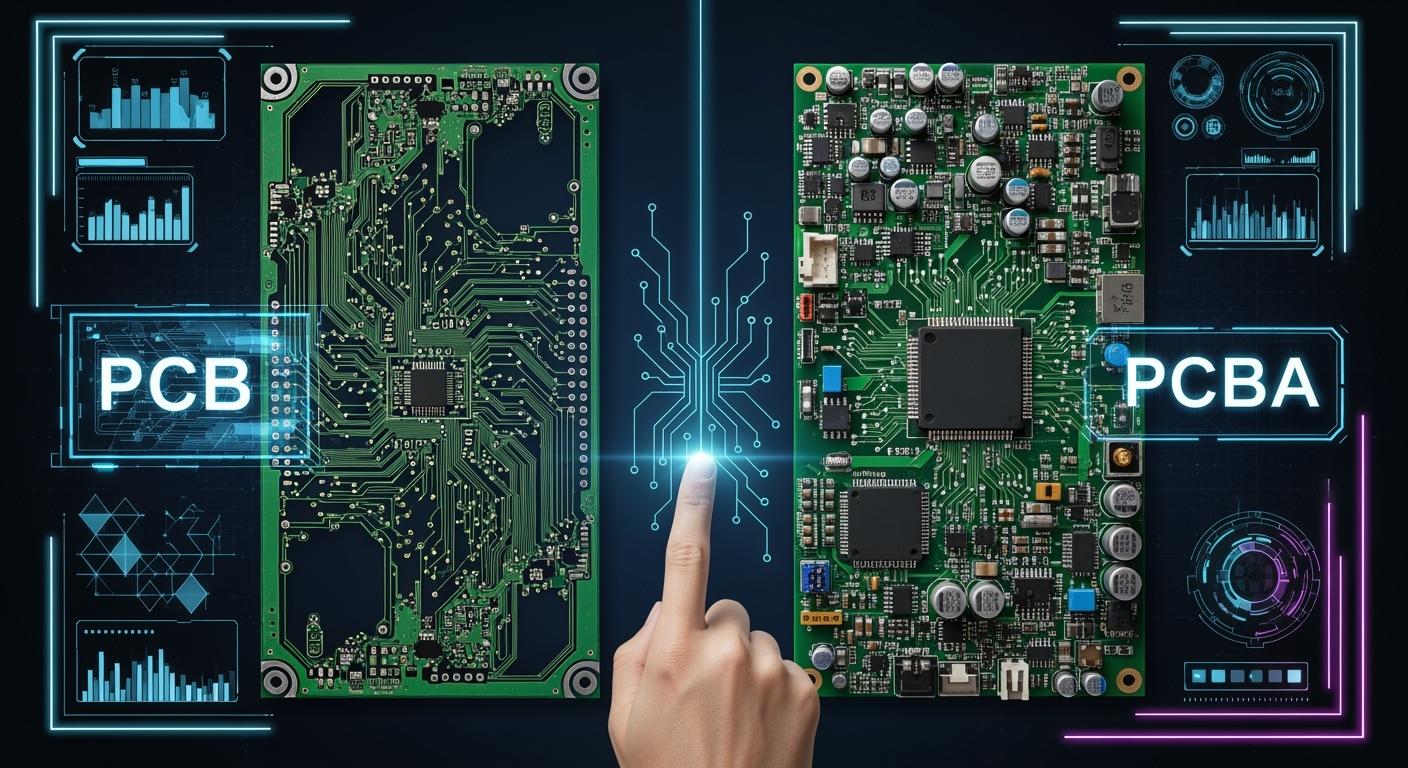
You might wonder what sets a printed circuit board apart from a printed circuit board assembly. A printed circuit board serves as the base that connects electronic parts, using copper tracks instead of wires. In contrast, a printed circuit board assembly includes the board and all the electronic parts attached to it. The Key Differences matter because you need to know if your project requires just the board or a fully assembled solution. The global market for these products keeps growing, as shown below:
Year | Market Size (USD Billion) | CAGR (%) |
|---|---|---|
2025 | 103.6 | N/A |
2026 | 108.6 | 5.50 |
2031 | 140.6 | N/A |
2035 | 176.6 | N/A |
Understanding these basics helps you make the right choice for your needs.
Key Takeaways
Know the difference. A PCB is just a board. A PCBA has all the parts on it. Pick what you need for your project.
Think about how hard your project is. Easy projects may only need a PCB. Harder projects need a PCBA to work right.
Look at the costs. PCBs cost less than PCBAs. This is because PCBs have fewer parts and are easier to make.
Plan for how long it takes. PCBs can be ready in a few days. PCBAs take longer because they need to be put together and checked.
Pick a good supplier. Find one with skill, quality awards, and helpful support. This will help your project do well.
PCB Explained
What Is a Printed Circuit Board?
You can find a printed circuit board in most electronics. A pcb is a flat board that holds parts together. It uses copper tracks to connect the parts, not wires. The pcb is like the backbone of your device. It gives support and lets electricity move where it should. If you open a remote or computer, you will see a printed circuit board inside. It helps all the parts work as one.
Types of PCB
There are many types of pcbs in electronics. Each type is made for a special job. Some devices use simple boards. Others need more complex ones. Here is a table that lists the main types of pcbs, their features, and where you might see them:
Type of PCB | Description | Common Applications |
|---|---|---|
Single-layer PCB | Has one copper layer, used in simple products. | Basic electronics |
Double-layer PCB | Has copper on both sides for more parts. | More complex devices |
Multilayer PCB | Has three or more copper layers for tricky designs. | Smartphones, servers |
Flexible PCB | Made from bendy materials for small spaces. | Wearable electronics |
Rigid-flex PCB | Mixes hard and bendy parts for tight spots. | Space-constrained uses |
Pick the right type of pcb for your project. The kind you choose will change how your device works and its price.
PCB Uses
Pcb technology is used in many fields. Cars use printed circuit boards in electric systems. Phones, tablets, and smart gadgets need pcbs to work. Factories use pcbs to run machines and robots. Data centers use special pcbs to power servers and cloud tools. The type of pcb you need depends on your industry and product.
Tip: When you plan your project, think about which types of pcbs fit your device’s size, shape, and job. Picking the right one can save money and help your device work better.
PCBA Explained
What Is a PCBA?
You may see the term pcba when you look at electronics. A pcba stands for printed circuit board assembly. This means you have a circuit board with all the electronic parts attached. The assembly process adds resistors, chips, and other components to the board. This turns a simple board into a working part of your device. The main job of a pcba is to connect these parts and guide electrical signals. This makes sure your device works the way you want. A pcba is not just a blank board. It is a finished product that can do its job in a phone, computer, or appliance.
Note: A printed circuit board assembly gives you a complete electronic circuit. It is ready to use in your project.
PCBA Assembly Process
You need to know how a pcba comes together. The assembly process has several steps. Each step helps make sure the final product works well.
Solder paste application: You spread solder paste on the board where parts will go.
Pick and place: Machines put tiny parts on the board.
Soldering: The board goes through heat to attach the parts.
Inspection and testing: Experts check the board for mistakes.
Final assembly: Workers add any last parts by hand.
Cleaning and packaging: The finished pcba gets cleaned and packed for shipping.
Each step in the assembly process helps create a reliable pcba. Careful work at every stage means your device will last longer and work better.
PCBA Applications
You find pcbas in many devices you use every day. These assemblies power smartphones, tablets, and smartwatches. Computers for home and work also use pcbas. Entertainment systems like TVs, stereos, and game consoles need pcbas to run. Many home appliances, such as refrigerators, microwaves, and coffee makers, rely on pcbas to control their features. The range of applications shows how important pcbas are in modern life.
Tip: When you choose a pcba for your project, think about the type of device and its needs. The right assembly can improve performance and reliability.
PCB vs PCBA: Key Differences
Definition & Function
It is important to know how a pcb and a pcba are different. A pcb is just a plain board. It gives support and connects parts with copper lines. You use it to hold electronic parts in place. A pcba is a pcb with all the parts already put on it. The pcba can do special jobs because the parts are there. Look at the table below to see the difference:
Aspect | PCB (Printed Circuit Board) | PCBA (Printed Circuit Board Assembly) |
|---|---|---|
Definition | Bare board for support and connections | Populated board with all components |
Function | Foundation for mounting components | Performs functions with mounted components |
Making a pcba means turning a blank pcb into a board that works. First, you start with a pcb. Then, you add parts using steps like surface-mount technology and soldering. This makes the board ready to use in your device.
Manufacturing Stage
There is another big difference in how they are made. Making a pcb means you get a blank board with no parts on it. This step is easy and gives you the base for more work. You always need a pcb before you can make a pcba. To make a pcba, you put parts onto the pcb. This makes it ready for use in things like phones or computers. This step uses surface-mount technology and thru-hole technology. Surface-mount puts parts right on the pcb. Thru-hole drills holes and puts parts with wires through them. These steps make the pcba harder and cost more.
Complexity & Components
You can see that pcb and pcba are not the same in how hard they are to make. A pcb has simple lines and is easy to design. It only holds parts but does not do anything by itself. A pcba has many parts that let it do real jobs. You will see resistors, chips, and connectors on a pcba. Making a pcba is harder because every part must go in the right spot. The table below shows how they are different:
Aspect | PCB Complexity | PCBA Complexity |
|---|---|---|
Component Integration | Basic electrical connections | Includes various components for functionality |
Design Complexity | Simpler, focused on layout | More complex, requires precise assembly processes |
Manufacturing Cost | Generally lower | Higher due to additional assembly requirements |
When you compare pcb and pcba, check how many parts are used. More parts mean the job is harder and takes more work.
Cost Comparison
You should think about cost when looking at the differences. The materials you pick change the price for both pcb and pcba. FR4 is a common choice because it is not too expensive and works well. If you need special materials for tough jobs, the price goes up. Thicker copper layers also cost more and change how the board works.
Labor costs depend on how hard the design is and how skilled the workers are. The price for making a pcba can change because of these things. Testing, like ICT and AOI, adds more time and money. These tests help find mistakes and make the board better.
Any test, like ICT, flying probe, AOI, or X-ray, takes more time and money, but it helps stop mistakes.
Making a pcb costs less because you only make the board. Making a pcba costs more because you add parts, put them together, and test them. You need to think about these things when you pick between pcb and pcba.
Summary Table: PCB vs PCBA Key Differences
Key Differences | PCB | PCBA |
|---|---|---|
Definition | Blank board | Board with components |
Function | Supports components | Performs functions |
Manufacturing Stage | Simpler, creates base | Complex, adds components |
Complexity | Basic layout | Precise assembly, many components |
Cost | Lower | Higher due to assembly and testing |
Knowing these differences helps you choose what is best for your project. When you understand pcb and pcba, you can pick the right one for your needs, money, and time.
Buyer Impact: Choosing PCB or PCBA
Project Requirements
Start by thinking about what your project needs. If your design is simple, you might only need a pcb. If your project is more complicated, you will need a pcba. A pcba is best when you have lots of electronic parts and need a working circuit. For small or test projects, a plain pcb can be enough. Think about how many you want to make. Making many at once makes pcba services cheaper. You also need to know if you can put the parts on the board yourself. If you cannot do this, you should pick a pcba.
Harder designs need more parts and a full circuit board assembly.
Making lots of boards makes pcba services a better deal.
A pcb costs less for easy or early projects.
Your skills with assembly will help you choose.
Lead Time & Quality
Lead time means how long it takes to get your boards. Making a pcb usually takes 5 to 10 business days. Some companies can make them faster, in just 1 to 3 days. A pcba takes more time, about 2 to 4 weeks. This is because you need to make the board, buy parts, and put them together. These extra steps make pcba take longer and cost more. Plan for this if you need your boards soon.
Quality is important for every project. Both pcb and pcba must be made well. Look for certifications like IPC-A-610 for assembly and ISO for quality. RoHS means your board does not have bad materials. UL listing and ITAR help keep things safe and protect special technology.
Certification/Standard | Description |
|---|---|
IPC-A-610 | Sets assembly quality standards |
ISO | Ensures quality management |
RoHS | Restricts hazardous materials |
UL Listing | Covers safety requirements |
ITAR | Protects sensitive technology |
When to Choose PCB
Pick a pcb if your project is easy or you want to put the parts on yourself. If you are testing a new idea or only need a few boards, a pcb saves money and time. This is a good choice for students, hobbyists, or engineers who want to add their own parts.
When to Choose PCBA
Choose a pcba for hard projects with lots of parts. If you need your boards fast and want high quality, pcba services are a good choice. Companies use pcba for making many boards and when they want strong and reliable boards. Pcba services also help with fast testing and making your boards work better.
Tip: Think about how hard your project is, how much time you have, and how good you want your boards to be. Picking the right one will help you finish your project on time and not spend too much money.
Supplier Selection Tips
Picking the right supplier is very important for your project. The right choice can help your project do well. You want a partner who gives good quality, fast work, and helpful support. Use these lists and questions to help you choose the best company for your electronics.
PCB Supplier Checklist
When you look for a supplier for printed wiring boards or multilayer pcb, check these things:
Criteria | Description |
|---|---|
Expertise | Look at the supplier’s experience and past work. |
Manufacturing Capabilities | Make sure they can make your pcb, even custom or big orders. |
Quality Standards and Certifications | Check for IPC-A-600, ISO 9001, and other important certifications. |
On-Time Delivery | See if they send circuit boards when they promise. |
Customer Support | Make sure they answer questions and talk clearly. |
Pricing Transparency | Ask about all costs so you do not get surprised. |
Tip: A good pcb partner helps you go from small tests to big orders.
PCBA Partner Checklist
For production pcba services, you need a partner who can handle hard jobs and follow rules. Use this table to help you pick:
Qualification Type | Description |
|---|---|
Expertise and Manufacturing Capabilities | Check if the company’s history fits your electronics needs. |
Product Certifications | Look for AS9100D, RoHS, and other safety or rule marks. |
On-Time Delivery | Pick a partner who always meets deadlines. |
Customer Support | Choose a company that is helpful and answers fast. |
Cost | Find a good balance between price and quality for your project. |
Note: The right pcba partner helps you from design to big orders and stops costly mistakes.
Questions for Suppliers
Before you order, ask these questions to make sure your supplier is right:
How do you check new materials and finished pwb?
What quality checks do you use, like AOI, X-ray, or looking by eye?
Do you offer working or in-circuit tests for assemblies?
Can you give certificates and records for what you build?
How do you pack and ship to keep my boards safe?
What do you do for special needs in big orders?
These questions help you find a supplier who cares about quality and doing a good job. You can trust your printed wiring boards or assemblies will meet your needs.
You now know the main differences between PCB and PCBA. A PCB gives you a blank board. A PCBA gives you a board with all parts ready to use. These facts help you pick what fits your project best.
Check your project needs.
Compare suppliers.
Think about cost and time.
Make smart choices for your electronics. Ask questions and choose the right partner for your next project.
FAQ
What is the main purpose of a PCB?
You use a PCB to support and connect parts in electronic circuits. The board has copper tracks that guide electricity. This helps your circuits work safely and correctly.
How does a PCBA differ from a PCB in circuits?
A PCBA has all the parts mounted on the board. You get a complete solution for your circuits. A PCB is just the base. You must add parts before your circuits can work.
Can you use the same PCB for different circuits?
You can use the same PCB design for similar circuits. If your circuits need different parts or layouts, you must change the design. Always check your circuits’ needs before reusing a PCB.
Why do circuits need testing after assembly?
Testing helps you find problems in your circuits. You make sure every part works as planned. This step keeps your circuits safe and reliable.
What should you check before ordering PCBA for your circuits?
Always review your circuits’ design and parts list. Make sure the supplier understands your circuits’ needs. Ask about testing and quality checks for your circuits.
See Also
Understanding PCBA: Key Components and Their Functions
Choosing the Right PCBA Supplier for Your Requirements
Comprehensive Overview of PCBA Manufacturing Techniques Explained
